Showing posts with label rubyonrails. Show all posts

Monday, November 05, 2007

Playing with InstantRails behind a Firewall

Normally I will just use the trusty Command prompt to play with Rails stuff. Just got around to play with InstantRails lately , while reading "Build Your Own Ruby on Rails Web Application". Perhaps this is not really InstantRails specific, rather more for setting up rails for behind a firewalled environment. I used to go it via the manual way, download all the gem, and do the install from local.

Found this while playing with InstantRails, might be handy if you are in the same situation as well.
  • Install InstantRails.
  • Unzip to C:\InstantRails. Spaces in path name will not work, also, Windows Compression option might have problem in extracting the file, use other options like 7zip, or winzip instead.
  • After extraction, double-Click on InstantRails.exe file in the folder. A message pop-up to confirm on regenerating the configuration files. Click on ok.

  • And so, InstantRails started.

Next up will be updating gem version as well as installation of Rails. Now, if you are not behind a firewall, that will be pretty straightforward, just do these,

Rails Application > Open Ruby Console Windows, type

  • C:\InstantRails> gem update –system
  • C:\InstantRails> gem install rails –include-dependencies

However, if you are behind a firewall, then you will have to do set the http_proxy first.

set http_proxy=http://username:password@proxy.whateverthename.com

then, you should be able to do the normal

  • C:\InstantRails>gem update –system
  • C:\InstantRails>gem install rails –include-dependencies

Tuesday, October 09, 2007

Free Ruby on Rails book


If you still didn't know about this news, Sitepoints is offering the "Build your own Ruby on Rails Application" free for download in pdf format. Yes, free, absolutely free.


I was caught in a bit of surprise when I read it from my google reader, but wake myself up quickly to download the 22Mb file, :-). Understand that Sitepoints server even been take down by the heavy traffics once the news was announced. The offer is valid for the next 60 day, counting from 2nd October. So better be quick.

Tuesday, July 03, 2007

Ubuntu Update

Well, the CD didn't arrive faster than my download. I have actually install Ubuntu after downloaded the image, in fact this post is being typed and published in Ubuntu while I still waiting for the CD.

This could be just my personal opinion, Ubuntu 7.04 did feel a bit faster than Fedora Core 7.0 on the same machine. I heard a lot of rave about the simplicity of Ubuntu menu layout, but I didn't really see a big different with Fedora. Oh, and I think Fedora Core artwork look nicer than Ubuntu, I especially love the hot air balloon in version 7.0.

But moving around menu and installing applications did feel faster in Ubuntu, not sure why. System boot up also seems to be a lot faster. So far, I have already installed ruby, rails and also mongrel, so can play with Rails in Ubuntu now.

But something really bad happen after installing Ubuntu though, it seems like I couldn't login to Fedora at another partition. Can't even mount it after boot into Ubuntu. Have read lot of tips and hints on the net, but still trying.

Another great thing about Ubuntu is that the irc channel #Ubuntu is really useful, I have lot of my questions answered there.

I hate how Ubuntu displaying Chinese Character though....down right ugly, see screenshot below. Even after I have downloaded a few font packages, it still look the same. Damn. Fedora Core would have no problem at all displaying Chinese Character straight out of the box.

Tuesday, June 12, 2007

Quoting Project

I have been looking for some guides on quoting a project. Well, I swear that I have seen it thousand times when I didn't really looking for it. But somehow, when I try to look for it, it is not much reliable, or at least believable source on the net that talk about how to quote a project.

Which is really strange.

Still, here are some information I manage to grab by googling around. Not much, but hopefully something to start with... well if someone could chip in to share on their experience in quoting a project, would be really appreciated. :-)

There are 2 podcasts from Freelancing on Rails, talking on Quoting a Project, part1 and part2, and also a podcast on Contract and Agreement , almost exactly what I need at the moment. But the download is still in progress due to my pathetic bandwidth, so can't say if it is really helpful at press time, we will see.

Freelanceswitch site offer a few tips on this as well.

And here is an dated discussion in the popular Joel on Software Discussion Group.

But still, I remember I have seen much much more people talking about how to quote their project on the net, just don't know where they are hiding, hmmm...have to dig deeper.


Update
Now, here are more tips on quoting/pricing a project.

Well, the danger is now I get more articles and guides to read that I might spent more time on it than actually working on the project..haha.

Thursday, May 31, 2007

Free lunch

Have been scouting for a free web hosting which support Ruby on Rails for sometimes. If you Simply google for it, most likely you will come to names like RailsPlayground, HostingRails, AmbitiousLemon, FreeOnRails, XMG, soyhost, profuse.net., etc. And you would thought, hey, there is free lunch after all.

But the journey of finding a free Rails web hosting, is not necessary a good one. So I thought, I might as well write it down here, could be a handy guide in case someone are in the same situation. Or better still, if someone could chip in and help out on this.

Out of the names listed above, I have tried a few of them. Since I don't have much time to go through everyone of it, the outlook of their site quickly become one of the most important factor on whether I wanna try my luck with it. I know judging a book by it cover is a bit swallow, but site that cluttered with flash adds, text links can't help but make you feel a bit cautious...ha, I know this might even look to you as one of those "10 Most Visually Appearing Free Rails Web Hosting site" from Smashing Magazine. :-)


Soyhost first impression really..impressed me.
Its simple design immediately make you feel comfortable to try out their service. Submission of application seems really easy, just put in your e-mail address and click the "make it happen button".tata....err.. I have tried more than 20 times, on different times and days as well, but the "make it happen" button just didn't make anything happen. It keeps on showing you the same old error message "File not found. Change this error message for pages not found in public/404.html."And the worst thing is, there is zero contact information in the page, no mail address, no link to a blog or something. You just feel like being left in a dessert, hopelessly.


AmbitiousLemon is another one with simple and neat webpage design.
The application process seems easy enough, only that "AmbitiousLemon is currently not accepting new members, please check back soon". And I have seens that message for months, so I am really not sure if they will ever open it again. Just keep your finger crossed.


If I remember it right, FreeonRails and HostingRails both offered some special promotion with Dreamhost, sometimes ago.


Where you could sign up with them for free hosting, then signup a Dreamhost promotion account that gave you free domain name , put in some promotion code from this sites to counter off the charges for the Dreamhost account, then tata..you get a free hosting plan with free domain name. But the thing is, Dreamhost no longer offer such deal. And FreeonRails didn't give you free domain name, not even sub-domain name. And the site's latest news last updated on February 11, 2006, and I didn't tried to apply for an account yet, so I am not sure if it still valid. As for HostingRails, well, just say the free hosting plan no longer available.


RailsPlayground is the same case, no more free hosting plan. The closest I can find in their front page is "Free setup", duh.


ProfuseHost website has a rather busy design, with ads visible almost on every possible white space.
But heck, after the disappointment of being deceived by good look, I don't believe in clean-simple design anymore. After all, I do understand the need to generate revenue for their business, especially they are offering free hosting. The application process is relatively much more complex, other than standard stuffs like password, username, email, etc, they would like you to give them a valid reason why you need a free hosting plan. I almost feel like filling in a immigration form before entering a foreign country. And so I happily filled in the form, and waited for 2 days for their decision. Well, it has been rejected, reason is my application didn't really comply to their policy. I am a bit disappointed of course, but understand that there might be somewhere in my application which might have just violated their policy. It is more to I didn't have time to read their policy in details than anything else.


XMG hosting look much like profuse, and their application process work almost the same as well.
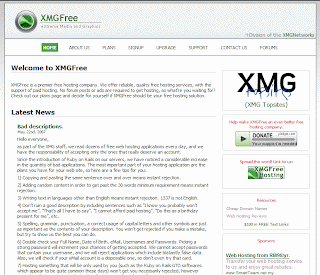
Well, I signed up by filling in all the information, plus the reason of course. That is yesterday. Still awaited for their decision if I will be accepted. So, wish me luck.

Friday, April 20, 2007

Junebug wiki

While browsing the list of blogs in RubyCorner, come across Junebug wiki as mentioned in RobbyonRails. The title "goodbye instiki, Hello Junebug Wiki" rather grabbing my attention immediately.

I have been looking for a simple wiki tools for a while, just for the purpose of putting down my own notes. Have had a brief test run on Instiki, I must admit that due to the really short time I spent with it, it didn't really leave a big impression on me. So, I thought, heck, why not give this funny named "Junebug wiki" a try?

Since I am sitting behind a proxy, installation wouldn't be as simple as gem install, but I really want to figure out a way of getting around it this time and not having to manual install again. I have tried

gem install GemName --Source -p http://proxy_name:80

but that didn't work. After googling around, found a solution, suggesting to turn on the "Use HTTP 1.1 through proxy connections" setting in Internet Explorer, which work immediately, I could install sqlite3-ruby gem straightaway. But installation of junebug still stuck though, and installation of the dependent gems still trigger the need of other gems, even --include-dependencies couldn't get the installation go automatically. So one after another I still look for these gems from rubyforge and installed it manually,

  • markaby-0.5.gem
  • builder-2.0.0.gem
  • metaid-1.0.gem
  • daemons-1.0.4.gem
  • camping-1.5.gem
  • junebug-wiki-0.0.28.gem
No, not necessary in that order. I didn't really remember the sequence I did the installation. But look like I still have to do most of the installation the hard way. Hmmm.

Well, after the installation, getting it to run is easy though, as advertised in TV. :-)

  • junebug wikiname -start some processes of creating tables in the background, then creating a initial user account, prompting username and password.
  • cd wikiname
  • ruby wiki run - start your wiki at 127.0.0.1:3301/ right away. Now here is the prove that I have really get it running, :-)


note: I don't know if the name has got anything to do with a 2005 released film "junebug", which by the way, won quite a number of prestigious film awards, sundance film festival included. But the official words is, there is no good story behind the name. :-)


Update
hmmm...seems like my installation of junebug wiki is broken after the succesful first run.
Just when I tried to explore it a bit further, it just show this,


I didn't change any setting on the computer or Rails in particular after junebug, so I am not too sure about the another instance running thing.

Update 2
Thanks to the advice from an anonymous comment, this problem exist mainly due to the "ruby wiki run" is a fore ground command, which might leave some old pid file when you quit by ^c.

That is what caused more than one instance running error. Suggestion from anonymous is to do "ruby wiki stop" a few times to make sure the wiki is stop.

Another command I found from RubyForge is to do a "ruby wiki zap". This command will actually delete the pid file and hence solve the problem.


Wednesday, February 07, 2007

love your frameworks

Any discussion on the blogs world comparing frameworks will almost immediately spark off religious-like flamewar. But I come across this in codahale's blog, and fully agree with it,

I like Ruby, but I try not to be emotionally involved with it. It’s a nice tool, but it’s not the only one.

Ok, he actually talked about Ruby here, but I think it is true to any Programming languages and frameworks too. They are after all, tools to help us perform our works. Being too emotionally involved with a particular programming language/frameworks sound pretty scary to me.

Just like we can't say English is better than Chinese, or French is better than Spanish. I think being able to appreciate the beauty of different languages/frameworks make this world a better place. Think so?

Monday, February 05, 2007

Rails in Mongrel

Been playing with Ruby on Rails lately.
Actually have tried my hand on Curt Hibb's legendary Rolling with Rails tutorial sometimes ago
while I am also playing with Django, but stop playing with it for a while until last December I saved up enough to buy David Black "Ruby for Rails"


Still have long way to go before finishing the book. But so far, I think this is quite a good book, not just for learning Rails, but also picking up Ruby, the language behind Rails.

I have tried to setup two environments for my rails adventure, one in Windows XP, and another in Fedora Core 6. There are tons of Tutorials online on how to setup RoR in XP and Fedora , so installing rail, creating a simple application, and then launching the rails apps with the standard WEBricks server shouldn't be that big a problem.

But as I tried to install Mongrel as the web server instead in XP environment, even though there are instructions available in Mongrel as well as Ruby on Rails HowTo on the installation, still there some surprises along the way.

From the Mongrel site, installation steps are as follow

  1. $ gem install win32-service (pick the most recent one)
  2. $ gem install mongrel (pick the win32 pre-built)
  3. $ gem install mongrel_service

But, somehow installing one gem will trigger for the message that another gem not listed above is needed. And installing that gem will trigger yet another gem. After a bit of wondering and googling around, I found some bits and pieces here and there, and manage to install mongrel eventually.

Here are the list of gems need to be installed, and in the listed sequence as well.

  1. fastthread-0.6.2-mswin32.gem This is not listed in the official mongrel instruction. Apparently, this is something to do with memory leak management. Here is the reason for this gem.
  2. gem_plugin-0.2.2.gem
  3. cgi_multipart_eof_fix-1.0.0.gem, this is related to DOS vulnerability, see here .
  4. mongrel-1.0.1-mswin32.gem
  5. win32-service-0.5.2-mswin32.gem
  6. mongrel_service-0.3.1-mswin32.gem

After installation, just start the rails application as usual, it will start with Mongrel by default. The sequence of rails looking for web servers is as below,
  1. Mongrel
  2. lighttpd
  3. WEBrick

If you happen to wanna tried out Rails with Mongrel in Windows, this list might save you a little bit of time.


Note: as pointed out by arjen, you could actually do a
gem install mongrel --include-dependencies
the installation will pretty much taking care of itself, but the thing is I am sitting behind a firewall, so have to do the gem installation manually, which lead to this rather messy situation.